Short answer: Use the Star map as a route back to books and passages you have connected. It visualizes existing books, excerpts, and confirmed connections. It does not automatically map every idea in a book, establish causality, or certify that two authors agree.
If you want to understand how candidates become decisions, start with connecting reading notes across books. The feature page is Star Map. This guide focuses on reading the resulting view, checking context, and understanding why it may be sparse.
Four things that should not be confused
| What you see | What it represents | What it does not establish |
|---|---|---|
| Books and excerpts | Reading material you saved | Completion or mastery of an entire book |
| Possibly related | A candidate from on-device text comparison | Agreement, citation, or causation |
| Confirmed | A connection you accepted | An AI-verified fact |
| Connections in the Star map | A visualization of books, notes, and accepted links | A complete, automatically generated knowledge graph |
A position, line, or label is a reading cue. It is not a reason to attribute a conclusion to an author when the passage does not support it.
Move from a candidate to the original text
- Open Connections in Review and inspect a Possibly related pair.
- Compare the excerpts and their book titles. Open note details to read the full saved text. Version 2.4 opens notes in full-text view and provides navigation between the passage, connections, and conversations.
- Choose Related when you can explain the connection, Unrelated when it does not hold, or Later when you need more context.
- If you just made the wrong decision, use Undo in connection details. This concerns the latest decision, not an unlimited history of every edit.
- Revisit accepted links under Confirmed, then use the Star map to see how your books and excerpts connect.
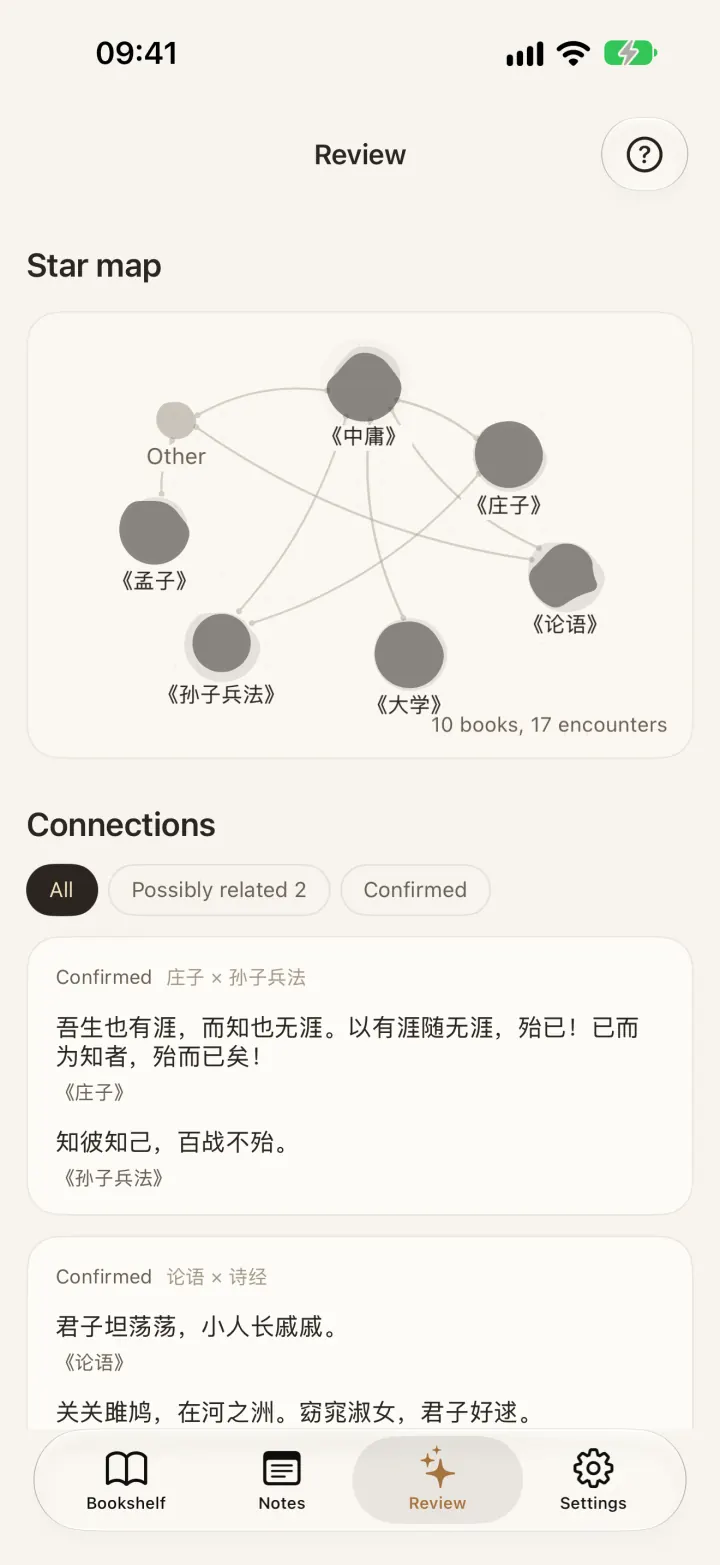
A full saved excerpt can still be a small part of a book. Consult the source when more context is needed. A pasted WeRead note or an OCR note does not automatically gain a jump back to the original book location.
Why the Star map may still be empty
Check for useful excerpts from at least two different books, then check whether you have accepted any connections. Importing two books alone does not guarantee meaningful candidates. Text quality, similarity, and your decisions all affect what can be shown.
Keep reading and save passages with enough context, or begin with a daily highlight review. There is no need to mark unrelated passages as related just to fill the map. This guide makes no promise about a fixed number of links or naming accuracy.
Example: the same word, a different question
Illustrative example: Two passages use “freedom.” One discusses personal choices; the other discusses public rules. Ask what question each author is answering and what limits they assume. You may keep the pair as an interesting contrast, or conclude that the shared word adds little.
Accepting a connection means preserving your reading lead. It does not mean the authors reached the same conclusion. If you ask AI to help compare them, provide the passages and a specific question, then check its answer. Online AI Q&A is separate from local candidate matching.
FAQ
Is the Star map a mind-map editor or automatic knowledge graph?
It is neither a general-purpose drawing editor nor a system that derives every concept from a whole book. It presents your existing books, excerpts, and confirmed connections.
Why is Possibly related separate from Confirmed?
A candidate needs a decision. Similar text can concern different situations, so you decide whether the connection is worth keeping.
Can I review notes without confirming connections?
Yes. Start with Today’s 5 quotes or a single note and add a thought. Filling the map is not a prerequisite for reading.
Does using the map send all my notes to AI?
Connection candidates are processed on-device. AI Q&A and optional AI proofreading are separate online actions with consent requirements; see the privacy policy.
Explore the Review feature guide or taking reading notes with enough context.