Short answer: EasyReadAI’s Review page brings excerpts and annotations from different books into Possibly related candidates. Choose Related, Unrelated or Later after reading the source notes. Links you accept appear in Confirmed and on the Star map. The feature offers leads for comparison; it leaves the conclusion to you.
If you are searching for “connect reading notes across books,” “find connections between book notes,” or a way to compare ideas from several books, think of Connections as a bounded review pass. It puts scattered material in front of you before you decide what belongs together.
What Connections does
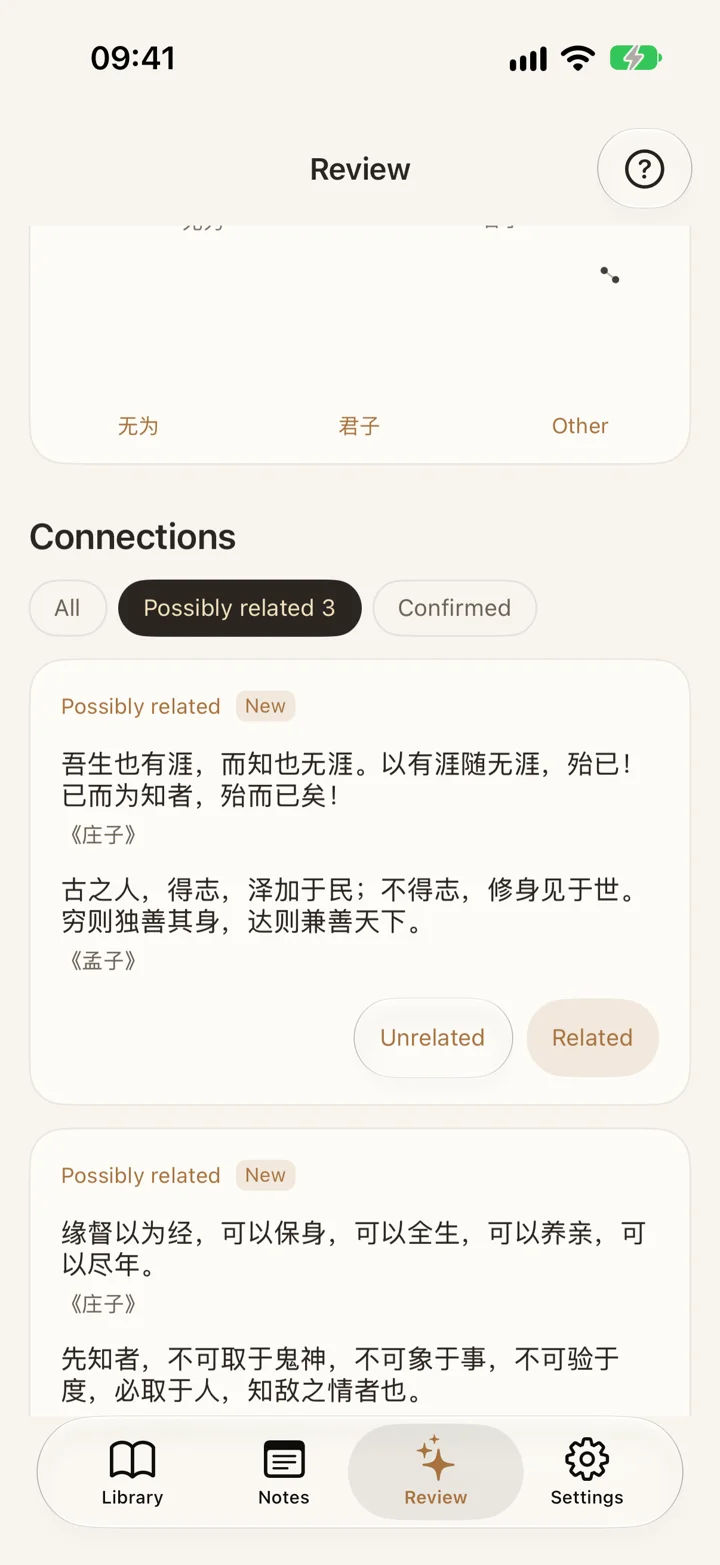
Connections (called Insights in earlier versions) gives you a sequence for comparing saved material:
- Open Review › Connections and select the Possibly related section.
- Read both candidate passages, then open their full notes to check the book titles and your original comments.
- Choose Related, Unrelated or Later. Leaving an uncertain pair for another reading is a valid decision.
- If you change your mind immediately afterwards, use Undo to reverse the most recent action.
- Open Confirmed to find the links you have accepted.
There is no need to build a tagging system first. Looking at the full notes helps distinguish a shared argument from two authors merely using similar vocabulary.
Where the notes can come from
Connections needs notes with usable text. You can mix:
- Highlights captured while reading an ebook
- Text copied and pasted from another reader
- Text checked after photographing a paper page
- Excerpts and annotations you typed yourself
Check titles and excerpts when saving material from different sources so that an author’s words stay attached to the right book. Nonempty excerpts saved through WeRead import or paper-page OCR are ordinary notes and can enter the pool for Today’s 5 quotes. Being eligible does not guarantee that a particular note will be selected. Imported excerpts from different books may also qualify as connection candidates, subject to text-quality and similarity checks.
Local processing and multilingual notes
Connection candidates are processed on your device, with support for multilingual notes. When reading in another language, keeping the original passage alongside your own annotation makes later comparisons easier to interpret. Language and context still affect how useful a candidate is: similar text is not necessarily a shared argument. Asking AI about the passage is a separate feature that needs a network connection.
When this review is useful
- Compare recurring ideas across books on a related theme
- Gather original passages before writing an article or discussion
- Revisit questions you left in several books months ago
- See candidates first instead of maintaining a complex tagging system
What it does not promise
Connections is not an automatic knowledge graph, a whole-book summary, a fact checker or a spaced-repetition schedule. A suggested pair is a possible lead, not proof of a causal relationship. Excerpt length, book identity and the surrounding context all matter. Confirmed records your judgment; it does not mean AI has established that two passages are related. Read the source notes before accepting a pair, particularly when familiar words might conceal opposing views.
From Connections to Star map and Today’s 5 quotes
After accepting a link, explore how Connections appears on the Star map, or return to an individual excerpt through Today’s 5 quotes and add a fresh comment. For another encounter on your Home Screen, use the iPhone reading highlights widget; search, book filters and CSV or PNG exports remain useful when you want to organize the material afterwards.